


Most of my work with a command-line agent is writing prompts. The agent (whether it’s Claude Code or Codex) does best when I give it as much information as possible. It’s really good at figuring out what I want from the latent constructs in the text I give it. That means my prompts can easily run to 300 words (or more), and typing 300-word prompts all day is energy-sapping. It’s drudgery. So the rational move is to make the prompt shorter, which degrades the answer and the work being done.
Earlier this year I realized how good speech-to-text has become, and I set it up on my desktop (Linux) and my MacBook Pro. Almost all my prompts are dictated now. It works like this: I hit a hotkey, talk into my mic for as long as the thought takes, hit the hotkey again, and about a second later the cleaned-up text is sitting at my cursor. My prompts are much longer as a result, and the output is better, because a language model can work out what I want even if I ramble a bit. It needs lots and lots of info and detail for it to work properly, and speaking is the cheapest way to give it that. I still type when I need exact wording though, like slash commands, paths, flag names, model IDs, etc. Otherwise, it’s all spoken.
I find this really useful when I need to explain a lot of stuff and closely supervise the work, like iterating on my own writing, drafting emails, turning rough ideas into prose, or providing detailed feedback on student assignments, especially writing assignments. When providing feedback, the bottleneck is often how much I’m willing to type out. Feedback requires a lot of explanation: what the problem is, why it is a problem, how to revise, which of multiple revision options is better, etc.
It’s not just a matter of talking being faster than typing; it’s also that I can think more fully when I talk. I can talk through an argument, qualify a judgment, add examples, revise as I go, and then clean it all up by editing (mostly by typing, but some by talking, too). This has made my advising of students a lot better, allowing for more specific, more useful feedback. I haven’t run an A/B test, but my impression, and I tell my students this, is that the feedback is much better than what they’re used to getting.
Typing isn’t obsolete, though. It’s still better for anything that has to be exact, and the best approach uses both. Your words also get modified somewhat on the way to text, especially if you want clean output; more on that below. In this post I cover how much the technology has improved and then the setup I run on Linux and macOS. Both are public: hyperwhspr for Linux and macwhspr for the Mac. Speech-to-text has lots of uses, but what follows comes mostly from my experience working with agentic AI.
Speech recognition is good now
For a long time, dictation was frustrating because fixing the errors took longer than just typing would have. In 2011, researchers at Microsoft cut the word error rate on conversational telephone speech from 27.4 percent to 18.5 percent by replacing Gaussian mixture models with deep networks (Seide, Li, and Yu 2011). This may sound pretty bad (almost one word in five is still wrong), but at the time it was a huge breakthrough. By 2016 the error on the same benchmark was 5.8 percent, on par with the then-measured 5.9 percent for professional human transcribers (Xiong et al. 2016). In 2017 it was 5.1 percent (Xiong et al. 2017).
OpenAI’s Whisper model made high-quality speech recognition accessible to all. The model, trained on 680K hours of data, achieves a zero-shot error rate of 2.7 percent on the LibriSpeech benchmark. It also shows a big improvement in robustness to accented speech and background noise compared to previous models (Radford et al. 2022). In 2023 OpenAI put it behind an API at $0.006 USD per minute (OpenAI 2023), or 36 cents per hour of speech. The 2025 generation, gpt-4o-transcribe, beats Whisper across the FLEURS benchmark, by OpenAI’s own evaluation (OpenAI 2025). Note: these numbers are all from different test sets so are not directly comparable, but they give a sense of the improvements in quality and cost.
The main remaining issue with speech recognition, once you get the accuracy good enough, is the latency after you stop talking before you get the transcription. The 2026 releases handle this by streaming the transcription back to you as you’re talking. ElevenLabs claims it can do this in under 150ms with their Scribe v2 Realtime model (ElevenLabs 2025), and OpenAI does it with gpt-realtime-whisper, which streams over a WebSocket, for a cost of $0.017 per minute (OpenAI docs). I just switched my two machines over to use it this week and the improvement is great.
The setup
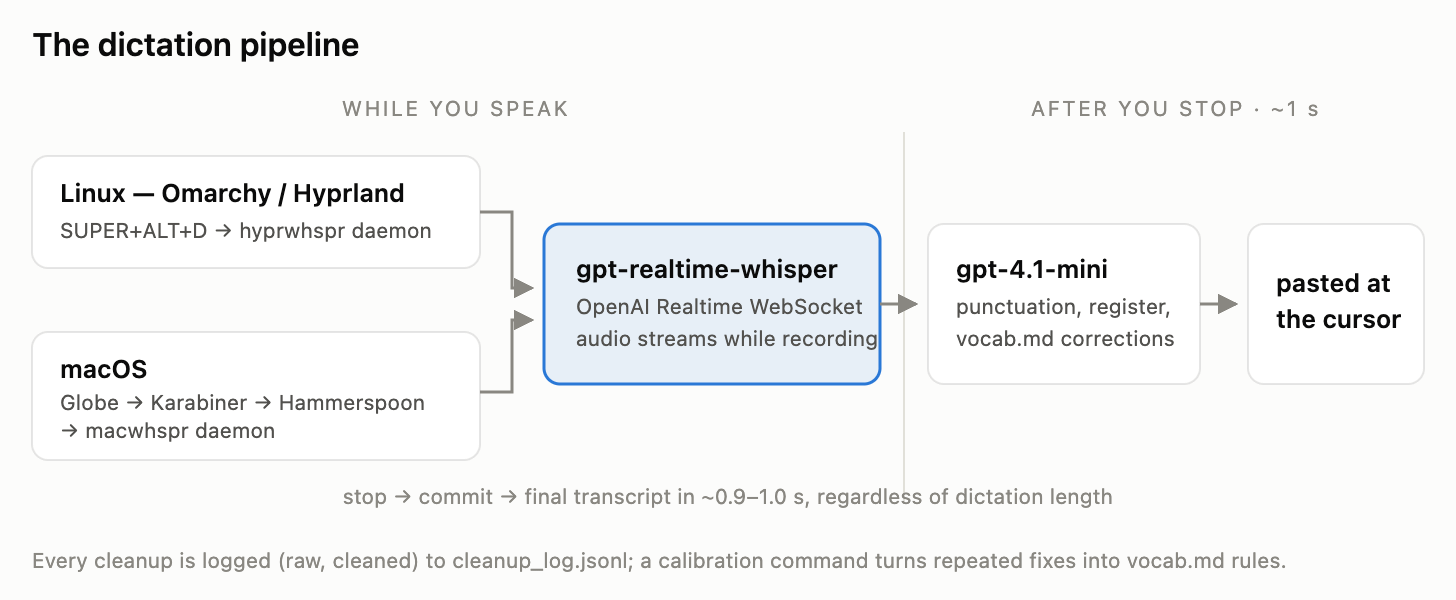
The pipeline is the same on both machines. I hit a hotkey to start recording. As I talk, the audio is streamed to a transcription model. Then I tap the hotkey again to commit the buffer and, after about a second, I get the final transcript. I run it through a small LLM to clean it up and then paste it at the cursor, which is usually in a terminal, but sometimes in a draft like this one.
hyperwhspr, for Linux
On Linux the recorder is hyprwhspr, and scdenney/hyperwhspr is the pattern I use to reproduce my configuration under Omarchy/Hyprland. It also includes the config for the backend to make it stream, the code for the hook that calls the cleanup model with a constrained prompt, the vocab file I’m using, a systemd service file (with some Wayland fixes), and the command I use to calibrate (feeding the cleanup model’s log in to create new vocab rules). I have a README with a dated table of all the issues I know about (the latest being this week’s move to a streaming model). The items are added either by my agents or by me.
macwhspr, for the Mac
There’s no hyprwhspr for macOS, so scdenney/macwhspr is the whole thing. It contains an idempotent install script and a small Python daemon that uses SoX to record audio and stream it to the transcription service, with the Globe key (press and release) to start and stop recording, and Karabiner and Hammerspoon for the hotkey and status indicator. The daemon runs in the background via launchd. If your transcript lands in the wrong window, you can recover one of your last 20 recordings with Ctrl-Cmd-V. Apart from the platform-specific bits, it uses the same transcription, cleanup, calibration, and logging pipeline as the Linux setup.
There’s one piece I initially underestimated, and that’s the cleanup stage. The transcription model inevitably produces messy output, with filler words, false starts, and little punctuation. To clean it up, I feed it into GPT-4.1 mini, very carefully prompting it to only add punctuation, paragraphs, and other formatting, and not to change the meaning of the transcription in any way. This way, if I prompt Claude by asking it a question, it will receive a properly formatted question, not an answer to my question. I also log all cleanups, and have a calibration command that goes through the log and updates a vocabulary file of spellings, names, romanizations, and other common corrections I want the cleanup stage to make. This is the main way the setup is personalized, and it gets better with usage.
Below is an example of what the setup looks like in action on my Linux machine. I press a hotkey to start, a pill appears that updates in real time as I speak, and when I press the hotkey again, the cleaned-up output is fed into the Claude Code prompt.
Latency differences
Previously, for both machines, the upload happened only after I had finished talking, and the time taken depended on how long I spoke for. Now that I have switched to the streaming backend, the work is done while I am still talking.
I tested this with the same audio (synthetic speech streamed at real-time pace over the same network), the only change being the backend. It’s a pretty modest difference for the short (6.5 second) clip (1.7 seconds for batch versus 0.9 for streaming), but for the longer (94 second) one, it’s an enormous improvement (5.9 seconds for batch versus 0.9 for streaming). Across the lengths I tested, streaming consistently takes about a second, regardless of length. My most recent dictation in the log is 128 seconds long (I was complaining about how LaTeX was laying out a table in a manuscript, undoubtedly an experience familiar to many of you); with batch I had to wait 5 seconds just for the transcription to appear. Now I wait about 1. Given that I do dozens of these per day, this is a big improvement. The new model is much better.
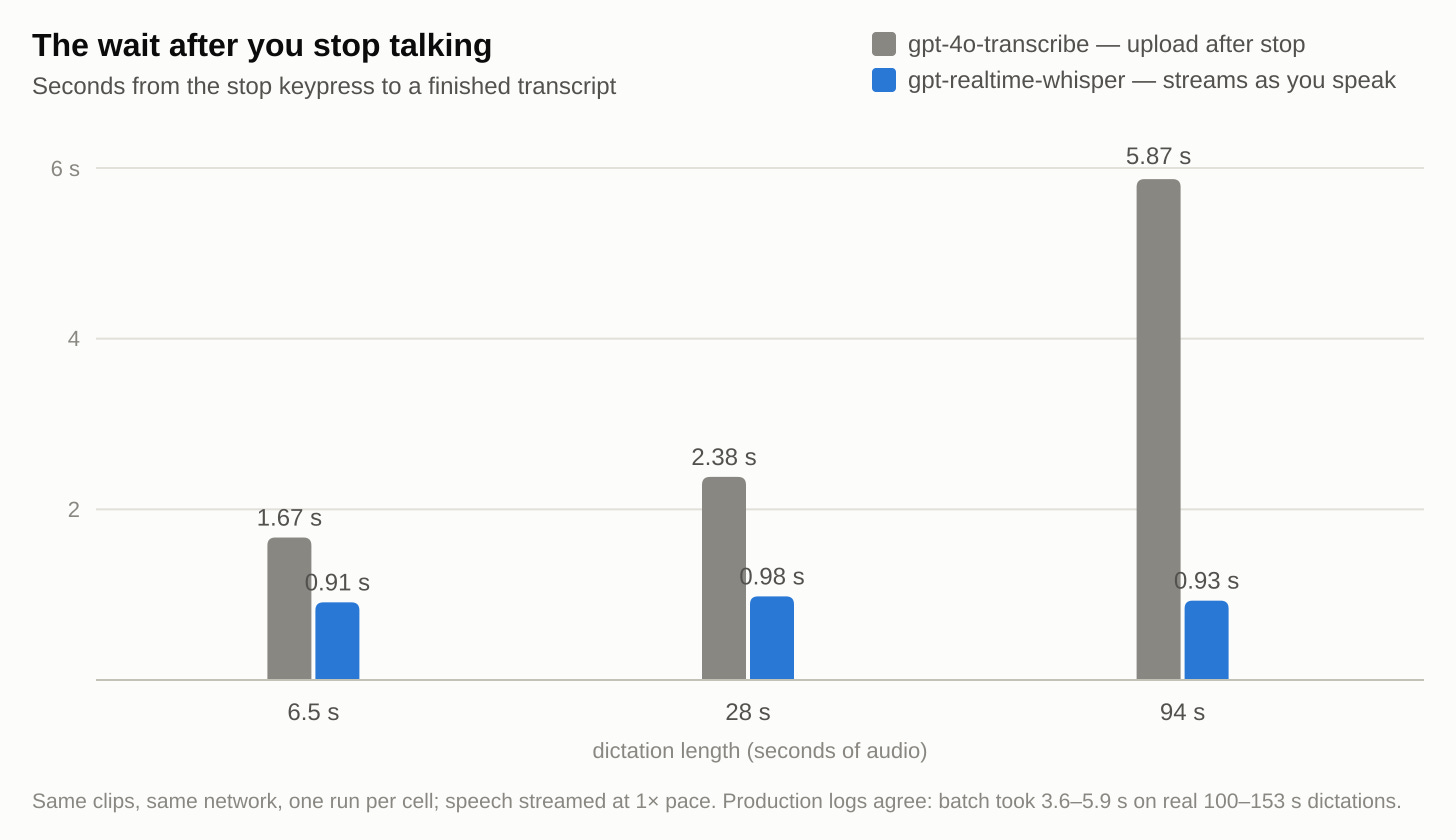
Each cell in the above chart corresponds to a single run. Similar results are visible in the production logs. The downside is that streaming is more expensive (0.017 USD/min vs. 0.006 USD/min). For a two-minute dictation, this translates into ~0.03 USD. Other minor downsides: (1) the realtime model does not accept a vocabulary prompt, so domain-specific terms have to be dealt with in the cleanup stage, and (2) websocket communication introduces additional failure modes. To mitigate (1) and (2), both repos allow you to switch back to the batch model with a one-line config change. Finally, if you do not want your audio data to leave your machine, hyprwhspr offers a locally-hosted ONNX backend that requires ~5.7 GB of VRAM to run, and you have to maintain the model yourself. I found it usable, but IMO the quality isn’t good enough to justify the hassle.
What a month of this costs
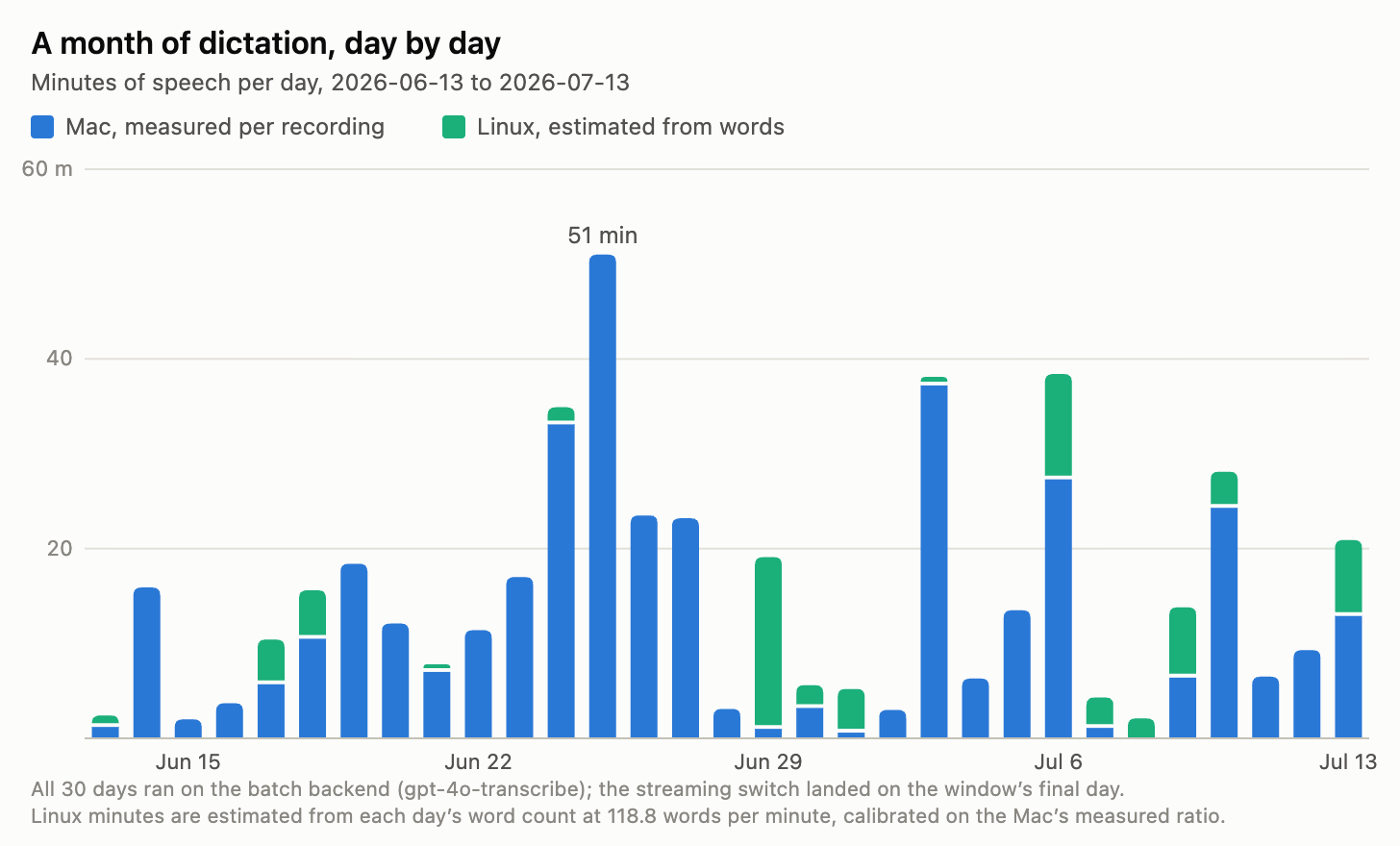
People often ask how much this costs to run, so before writing this post I went back and grabbed my logs from the last 30 days (June 13th to July 13th) on both of my machines. It turns out I’ve invoked dictation 662 times for a total of 7.7 hours of dictation, generating 54,796 words. The cost to transcribe those words was $2.77 USD; the cost to run the cleanup model was another $0.27, for a total of $3.04, or about 5.5 cents per thousand words. Keep in mind that this is using the old, batch-oriented backend. If I had been using the streaming backend (which is what I’m using now), it would have cost about $8.11 for the month. The difference is totally negligible for me, and really the only thing that matters is the latency.
Make the switch
I should mention that typing is still useful and will continue to be used when exactness is important, such as commands, file paths, quoting text, citations and other identifiers. Also, I still do my writing by typing. I’m not going to dictate a scientific manuscript, at least not anytime soon.
But typing shouldn’t be the only way you work with an AI agent. Only typing creates a trade-off where you either under-contextualize the agent or spend more time and energy contextualizing it. A combination of the two works best. Explain the problem to the agent out loud (the transcription and cleanup give you a first draft, which you can always edit), then type out the specific commands, paths, etc.
Voice input has reached a level of accuracy, cheapness, and immediacy where it’s no longer a gimmick or just an accessibility tool. If you’re doing serious work with agents and still typing out all your prompts, you’re bottlenecking yourself. If you’re not already using speech recognition to give detailed instructions to the agents in your computational (or non-computational) pipelines, you should be.